

Compare common receipt tracking methods
There is no single tool that fits every business. Choose based on receipt volume, the number of people making purchases, how often records are reviewed, and what your accountant expects to receive.
Paper folders or envelopes
Simple for low volume, but difficult to search, share, back up, or connect with structured details. Paper receipts can also fade or become separated from their context.
Cloud folders
Useful for preserving scans and PDFs. A consistent filename helps, but folders alone do not make missing amounts, categories, duplicate candidates, or unreviewed records easy to find.
Spreadsheet receipt log
Flexible and easy to export. It works best when every row links to the original document and everyone uses the same columns, categories, and review process.
Dedicated receipt tracker
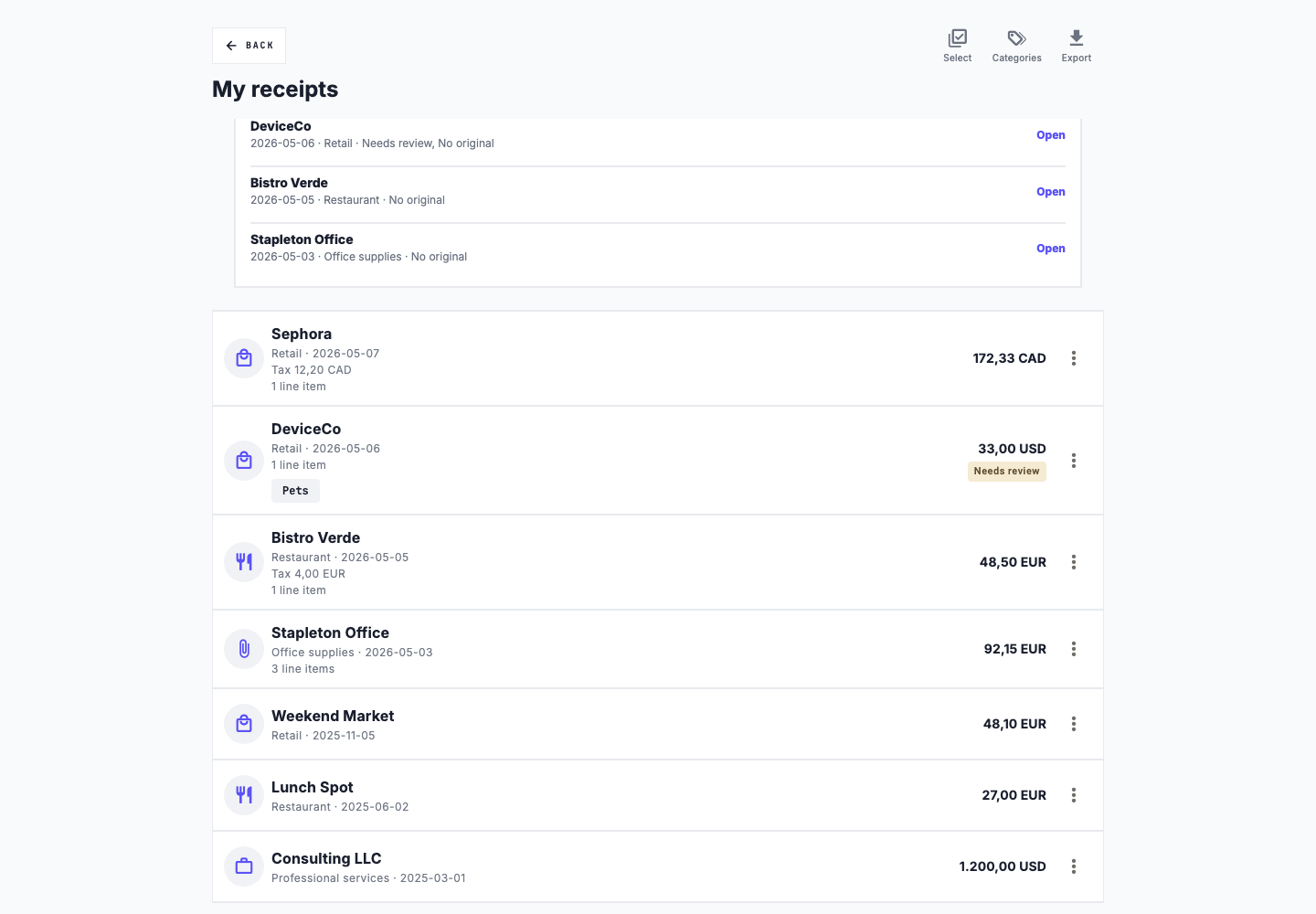
Combines source files with structured fields, filters, review status, and exports. It reduces manual organization but still requires users to check extracted information and maintain backups of important records.
A bank or card statement can help you find a payment, but it may not show what you bought. Keep the original receipt with your records.
What should a business receipt log contain?
A receipt log lists your business purchases and points to the original files. It should help you find a receipt and understand what you bought without guessing.
| Field | Why it helps |
|---|---|
| Merchant | Identifies the supplier or business paid. |
| Transaction date | Places the purchase in the appropriate reporting period. |
| Amount and currency | Preserves the recorded total and avoids ambiguity in multi-currency records. |
| Category | Groups similar expenses consistently for review and export. |
| Business purpose | Explains a purchase whose connection to the business may not be obvious later. |
| Original file | Connects the log entry with the image, PDF, or other source document. |
| Tax year and status | Supports filtering and shows whether the record still needs attention. |
A routine for keeping track of receipts
1. Capture receipts close to the purchase
Photograph paper receipts before they fade or get lost. Save emailed invoices and receipts in their original digital format. Confirm that the document is readable and complete.
2. Keep business and personal records separate
Use a dedicated business workspace, folder, or log. If a purchase has mixed use, preserve the facts and discuss the appropriate treatment with a qualified professional.
3. Review the recorded fields
Check merchant, date, total, currency, category, and purpose against the source. Automated extraction saves time only when incorrect values are caught before export.
4. Review the collection every month
Look for missing original files, incomplete fields, possible duplicates, inconsistent categories, and records that still need review. A short monthly process is easier than reconstructing twelve months at year end.
Common receipt tracking mistakes
- Leaving receipts in personal email, phone photos, or employee inboxes.
- Recording a total without preserving the source document.
- Using inconsistent categories for similar purchases.
- Assuming extracted fields are correct without reviewing them.
- Deleting possible duplicates without confirming that they represent the same transaction.
- Waiting until filing season to identify missing records.
- Waiting until the deadline to check whether your accountant can open the files.
Prepare records for your accountant
Ask your accountant which fields, file formats, category structure, and reporting period they prefer. Before sending anything, filter the correct tax year, resolve known gaps, and confirm that summaries still connect to the original documents.
Your files may include a spreadsheet log, a readable PDF summary, original receipt files, a list of unresolved records, and relevant mileage records. Requirements vary by jurisdiction and circumstances, so consult the applicable tax authority or professional rather than treating a generic checklist as tax advice.
Monthly business receipt checklist
- New paper and digital receipts have been captured.
- Every logged receipt has a readable source file.
- Merchant, date, amount, and currency have been reviewed.
- Categories use one consistent naming system.
- Business-purpose notes exist where context is not obvious.
- Missing records and possible duplicates have been investigated.
- The current tax year is backed up and exportable.
Check the official rules for your market
United States
IRS Publication 583 describes supporting documents and general business recordkeeping practices. It notes that records should support the entries in the business books and identifies documents such as receipts, invoices, paid bills, deposit slips, and canceled checks. Retention depends on the record and the circumstances, so confirm the current rule that applies to you.
Canada
The CRA says records must contain enough detail to determine tax obligations and entitlements and that source documents may be needed to support those records. Its Keeping Records guidance covers electronic systems, source documents, availability, location, and retention. Confirm the current requirement for your business and record type.
Prefer to start with a spreadsheet? Download the free business receipt log template.
For help organizing a year of receipts, see the related guide on how to organize tax receipts.
Track business receipts in one workspace
Save receipts, check the details, and log business trips in Slipfolio. Paid plans add checks for missing information and exports for your accountant.
Explore the small business receipt tracker